webman 2.0 配置数据库,访问模型
常用命令:
## 安装wenman命令行组件
$ composer require webman/console

## 打印webman版本号
$ php webman version

## 打印当前路由配置
$ php webman route:list


## 创建一个控制器文件
$ php webman make:controller admin       #将创建一个 app/controller/AdminController.php
$ php webman make:controller api/user     #将创建一个 app/api/controller/UserController.php

## 创建一个model文件
$ php webman make:model user
$ php webman make:model admin         #将创建一个 app/model/Admin.php
$ php webman make:model api/user        #将创建一个 app/api/model/User.php


## 创建一个中间件文件
$ php webman make:middleware Auth                  #将创建一个 app/middleware/Auth.php

## 创建自定义命令文件
$ php webman make:command db:config                #将创建一个 app\command\DbConfigCommand.php
使用模型,需要安装数据库组件
$ composer require -W webman/database illuminate/pagination illuminate/events symfony/var-dumper
1. 本地新建数据库。数据库名 test. 表名 t_user.
CREATE TABLE `t_user` (
  `id` int unsigned NOT NULL AUTO_INCREMENT,
  `name` varchar(32) COLLATE utf8mb4_general_ci DEFAULT NULL,
  PRIMARY KEY (`id`)
) ENGINE=MyISAM AUTO_INCREMENT=4 DEFAULT CHARSET=utf8mb4 COLLATE=utf8mb4_general_ci;
2. 修改数据库配置文件。 config/database.php
<?php
return  [
    'default' => 'mysql',
    'connections' => [
        'mysql' => [
            'driver'      => 'mysql',
            'host'        => '127.0.0.1',
            'port'        => '3306',
            'database'    => 'test',
            'username'    => 'root',
            'password'    => '',
            'charset'     => 'utf8mb4',
            'collation'   => 'utf8mb4_general_ci',
            'prefix'      => 't_',
            'strict'      => true,
            'engine'      => null,
            'options'   => [
                PDO::ATTR_EMULATE_PREPARES => false, // Must be false for Swoole and Swow drivers.
            ],
            'pool' => [
                'max_connections' => 5,
                'min_connections' => 1,
                'wait_timeout' => 3,
                'idle_timeout' => 60,
                'heartbeat_interval' => 50,
            ],
        ],
    ],
];
3.修改模型文件。 app/model/User.php
<?php

namespace app\model;

use support\Model;

/**
 *
 */
class User extends Model
{
    /**
     * The connection name for the model.
     *
     * @var string|null
     */
    protected $connection = 'mysql';

    /**
     * The table associated with the model.
     *
     * @var string
     */
    protected $table = 'user';

    /**
     * The primary key associated with the table.
     *
     * @var string
     */
    protected $primaryKey = 'id';

    /**
     * Indicates if the model should be timestamped.
     *
     * @var bool
     */
    public $timestamps = false;


}
4. 修改控制器。 app/controller/UerController.php
<?php

namespace app\controller;

use DOMDocument;
use support\Db;
use support\Log;
use support\Request;
use support\Response;

class UserController
{

    /**
     * 数据库查询
     *
     * 写入日志
     *
     * 读取配置
     */
    public function select()
    {
        $users = Db::table('user')->get();
        Log::info(__CLASS__ . ' log test: '. json_encode($users));
        Log::info(__CLASS__ . ' log test2: '. config("session.config.file.save_path"));
        return json($users);
    }
}
5. 重启服务。
$ php windows.php
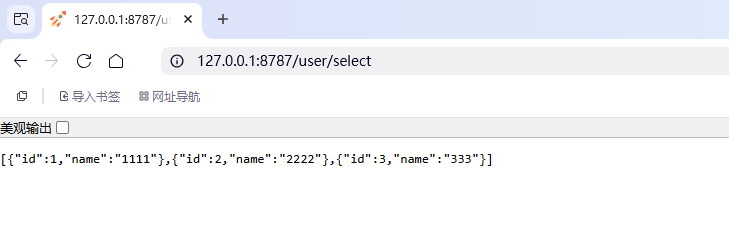
6. 访问请求
http://127.0.0.1:8787/user/select
使用中间件
修改 app/middleware/Auth.php 文件
<?php
namespace app\middleware;

use Webman\MiddlewareInterface;
use Webman\Http\Response;
use Webman\Http\Request;

class Auth implements MiddlewareInterface
{
    public function process(Request $request, callable $handler) : Response
    {
        echo '这里是请求穿越阶段,也就是请求处理前';

        $response = $handler($request); // 继续向洋葱芯穿越,直至执行控制器得到响应

        echo '这里是响应穿出阶段,也就是请求处理后';

        return $response;
    }

}
config/route.php
<?php
/**
 * This file is part of webman.
 *
 * Licensed under The MIT License
 * For full copyright and license information, please see the MIT-LICENSE.txt
 * Redistributions of files must retain the above copyright notice.
 *
 * @author    walkor<walkor@workerman.net>
 * @copyright walkor<walkor@workerman.net>
 * @link      http://www.workerman.net/
 * @license   http://www.opensource.org/licenses/mit-license.php MIT License
 */

use support\Request;
use Webman\Route;

Route::any('/user/{name}/{age}', [app\controller\UserController::class, 'route']);                                                      // http://127.0.0.1:8787/user/route?name=111&age=10

Route::any('/user/middleMethod', [app\controller\UserController::class, 'middleMethod'])->middleware([app\middleware\Auth::class]);     // http://www.webman.com:8787/user/middleMethod

//Route::group('/user', function () {
//    Route::group('/v1', function () {
//        Route::any('/create', function (Request $request) {return response('create');});
//        Route::any('/edit', function (Request $request) {return response('edit');});
//        Route::any('/view/{id}', function (Request $request, $id) {return response("view $id");});
//    });
//});


Route::group('/blog', function () {
    Route::any('/create', function (Request $request) {return response('create');});                // http://www.webman.com:8787/blog/create
    Route::any('/edit', function (Request $request) {return response('edit');});                    // http://www.webman.com:8787/blog/edit
    Route::any('/view/{id}', function (Request $request, $id) {return response("view $id");});      // http://www.webman.com:8787/blog/view/1
});

Route::group('/blog', function () {
    Route::group('/v2', function () {
        Route::any('/create', function (Request $request) {return response('create');});            // http://www.webman.com:8787/blog/v2/create
        Route::any('/edit', function (Request $request) {return response('edit');});                // http://www.webman.com:8787/blog/v2/edit
        Route::any('/view/{id}', function (Request $request, $id) {return response("view $id");});  // http://www.webman.com:8787/blog/v2/view/1
    });
});


Route::fallback(function(){
    return json(['code' => 404, 'msg' => '404 not found']);
});
app/controller/UserController.php
<?php

namespace app\controller;

use DOMDocument;
use support\Db;
use support\Log;
use support\Request;
use support\Response;

class UserController
{

    /**
     * 数据库查询
     *
     * 写入日志
     *
     * 读取配置
     */
    public function select()
    {
        $users = Db::table('user')->get();
        Log::info(__CLASS__ . ' log test: '. json_encode($users));
        Log::info(__CLASS__ . ' log test2: '. config("session.config.file.save_path"));
        return json($users);
    }
    public function add()
    {

    }
    public function update()
    {

    }
    public function del()
    {

    }


    /**
     * http://www.webman.com:8787/user/middleMethod
     */
    public function middleMethod()
    {
        return response('hello 111');
    }


    #######################################################################################
    /**
     * http://127.0.0.1:8787/user/route?name=111&age=10
     *      config/route.php 文件配置路由         Route::any('/user/{name}/{age}', [app\controller\UserController::class, 'route']);
     */
    public function route()
    {
        return response(json_encode(input()));
    }

    /**
     * http://www.webman.com:8787/user/route2?name=111&age=10
     *    通过GET POST方式传递name和age的值
     */
    public function route2(string $name, int $age): Response
    {
        return json(['name' => $name, 'age' => $age]);
    }

    #######################################################################################

    // http://www.webman.com:8787/User/index                    (返回字符串)
    public function index(Request $request)
    {
        return response(json_encode(['class' => __CLASS__, 'base_path' => base_path()]));
    }

    // http://www.webman.com:8787/User/hello?name=webman        (返回字符串)
    public function hello(Request $request)
    {
        $default_name = 'webman';
        // 从get请求里获得name参数,如果没有传递name参数则返回$default_name
        $name = $request->get('name', $default_name);
        // 向浏览器返回字符串
        return response('hello ' . $name);
    }

    // http://www.webman.com:8787/User/json?name=webman         (返回json)
    public function json(Request $request)
    {
        $default_name = 'webman';
        $name = $request->get('name', $default_name);
        return json([
            'code' => 0,
            'msg' => 'ok',
            'data' => $name
        ]);
    }

    // http://www.webman.com:8787/User/xml                      (返回xml)
    public function xml(Request $request)
    {
        header("Content-Type: text/xml");
        $dom = new DOMDocument();
        $root = $dom->createElement('data');
        $dom->appendChild($root);

        $name = $dom->createElement('name', 'John Doe');
        $root->appendChild($name);

        $age = $dom->createElement('age', 30);
        $root->appendChild($age);

        $dom->formatOutput = true;
        return $dom->saveXML();
    }

    // http://www.webman.com:8787/User/xml2                     (返回xml)
    public function xml2(Request $request)
    {

        $xml = <<<XML
               <?xml version='1.0' standalone='yes'?>
               <values>
                   <truevalue>1</truevalue>
                   <falsevalue>0</falsevalue>
               </values>
               XML;
        return xml($xml);
    }

    // http://www.webman.com:8787/User/jsonp                    (返回一个jsonp响应。 )
    public function jsonp(Request $request)
    {
        return jsonp([
            'code' => 0,
            'msg' => 'ok',
            'data' => 1111
        ]);
    }

    // http://www.webman.com:8787/user/view?name=tom            (返回一个视图)
    public function view(Request $request)
    {
        $default_name = 'webman';
        $name = $request->get('name', $default_name);
        return view('user/hello', ['name' => $name]);
    }

    /**
     * http://127.0.0.1:8787/user/requestMethod?name=tom
     * request() 只在请求生命周期内可用;在进程启动阶段或 CLI 任务中不可用。
     */
    public function requestMethod(Request $request)
    {
        // 常用读取
        // URL/方法/IP
        $method = request()->method();
        $path   = request()->path();
        $url    = request()->url();
        $ip     = request()->getRealIp();
        return response(json_encode([ 'method'=>$method, 'path'=>$path, 'url'=>$url, 'ip'=>$ip ]));

        // Query 与表单参数
        $id     = request()->get('id', 0);        // ?id=1
        $name   = request()->post('name', '');    // POST body (form)
        $all    = request()->all();               // 合并后的请求参数
        $only   = request()->only(['id','name']); // 指定字段
        $except = request()->except(['password']);

        // Header / Cookie
        $ua      = request()->header('user-agent', '');
        $cookie  = request()->cookie('sid', '');

        // Body / JSON
        $raw  = request()->rawBody();
        //$json = request()->json('key', null); // 仅当 Content-Type 为 application/json

        // 文件上传
        $file   = request()->file('avatar');          // 单文件
        $files  = request()->files();                       // 所有文件
        $tmp    = $file->getPathname();                     // 临时路径
        $origin = $file->getUploadName();                   // 原始文件名

        // 其他
        $scheme   = request()->scheme();    // http/https
        $host     = request()->host();
        $route    = request()->route();     // 当前匹配的路由对象(如需)
        $session  = request()->session();   // 获取 session 对象

        return response($method);
    }

    /**
     * http://127.0.0.1:8787/user/inputMethod?name=tom
     * 助手函数input()
     *      从post get 的集合中获取某个值。
     *
     *
     *
     * 下面用最简明的方式说明 input() 的用法,以及它与 request() 的区别与联系。
     * input() 是什么
     *      全局助手函数,用于“直接取参数”。等价于从当前请求里取输入参数的便捷方式,常见效果≈ request()->input($key, $default) 或合并后的 get/post/json 参数集合里取值。
     *      典型用法:
     *              $id    = input('id', 0);           // 取单个参数(优先从 Query/Form/JSON 中合并后的集合)
     *              $name  = input('user.name');       // 支持点语法(嵌套结构)
     *              $all   = input();                  // 不传参:返回合并后的所有输入参数数组
     *              $part  = input(['id', 'name']);    // 取部分字段(若支持)
     * request() 是什么
     *      全局助手函数,返回当前请求对象 support\Request,可做“任何请求相关操作”,不仅仅是取参数。
     *      典型用法:
     *              $r = request();
     *              $method = $r->method();
     *              $path   = $r->path();
     *              $ip     = $r->getRealIp();
     *
     *              $id     = $r->get('id', 0);        // 仅 Query
     *              $name   = $r->post('name', '');    // 仅 Form
     *              $jsonV  = $r->json('key', null);   // JSON Body
     *              $all    = $r->all();               // 合并后的参数
     *              $file   = $r->file('avatar');      // 上传文件
     *              $ua     = $r->header('user-agent');// Header
     *              $cookie = $r->cookie('sid', '');
     *
     * 二者区别一览
     * 关注点不同:
     *          input(): 专注“取参数”,一行取值,最省事。
     *          request(): 获取“请求对象”,能做取参以外的更多事(headers、cookies、files、路由信息等)。
     * 返回类型:
     *          input(): 返回具体参数值或数组。
     *          request(): 返回请求对象,需要再调用方法取值。
     * 能力范围:
     *          input(): 只关心输入参数(通常为 Query/Form/JSON 的合并视图)。
     *          request(): 全量能力(方法、路径、IP、Header、Cookie、文件、Session 等)。
     * 语义偏好:
     *          读参数优先用 input()(更简洁)。
     *          需要请求上下文细节时用 request()。
     *
     * 常见场景对照
     *          快速取一个参数(带默认值):
     *                  $userId = input('user_id', 0);
     *          需要判断请求方法、再取参数:
     *                if (request()->method() === 'POST') {
     *                      $payload = request()->all();
     *                }
     *          读取 JSON Body(内容类型为 application/json):
     *                  $v = input('key');            // 简洁
     *                  // 或更显式
     *                  $v = request()->json('key');
     * 【一句话总结】
     *      只“拿参数”用 input();需要“拿更多请求信息/操作”用 request()。
     */
    public function inputMethod()
    {
        //获取参数name
        $name = input('name');
        //获取参数name, 如果不存在则使用默认值
        $name2 = input('name','张三');
        //获取全部参数
        $all_params = input();
        return response(json_encode(['name'=>$name,'name2'=>$name2,'all_params'=>$all_params]));
    }

    // http://127.0.0.1:8787/user/hello?name=111                    (重定向)
    public function redirectMethod()
    {
        return redirect('/user/hello?name=111');
    }
}
app/model/User.php
<?php

namespace app\model;

use support\Model;

/**
 * t_user
 * @property integer $id (主键)
 * @property string $name
 */
class User extends Model
{
    /**
     * The connection name for the model.
     *
     * @var string|null
     */
    protected $connection = 'mysql';

    /**
     * The table associated with the model.
     *
     * @var string
     */
    protected $table = 'user';

    /**
     * The primary key associated with the table.
     *
     * @var string
     */
    protected $primaryKey = 'id';

    /**
     * Indicates if the model should be timestamped.
     *
     * @var bool
     */
    public $timestamps = false;


}
app/view/user/hello.html
<!doctype html>
<html>
<head>
    <meta charset="utf-8">
    <meta http-equiv="X-UA-Compatible" content="IE=edge">
    <meta name="viewport" content="width=device-width, initial-scale=1">
    <link rel="shortcut icon" href="/favicon.ico"/>
    <title>webman</title>

</head>
<body>
hello <?=htmlspecialchars($name)?>
</body>
</html>
本文为崔凯原创文章,转载无需和我联系,但请注明来自冷暖自知一抹茶ckhttp://www.cksite.cn
- 上一篇: 如何检查Windows系统下某服务的状态是启用还是禁用
- 下一篇: webman 2.0安装

请先登录后发表评论
- 最新评论
- 总共0条评论